# Cara Membuat Pesanan Nanti (BackOrders)

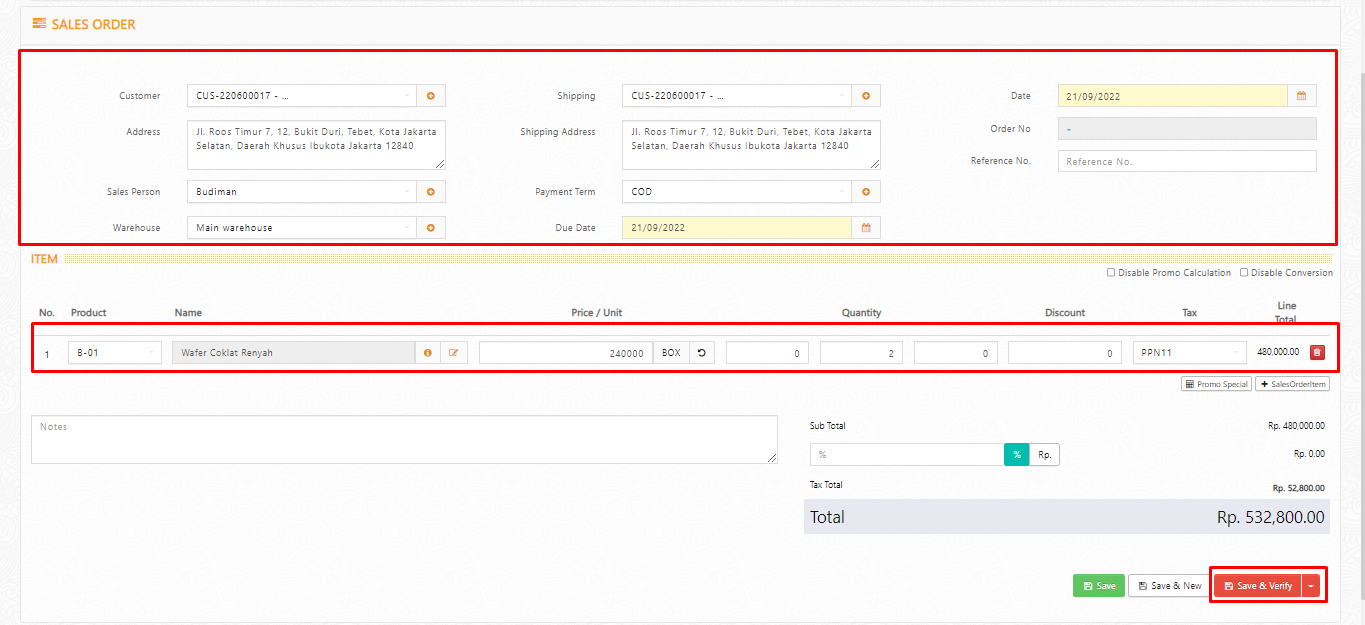
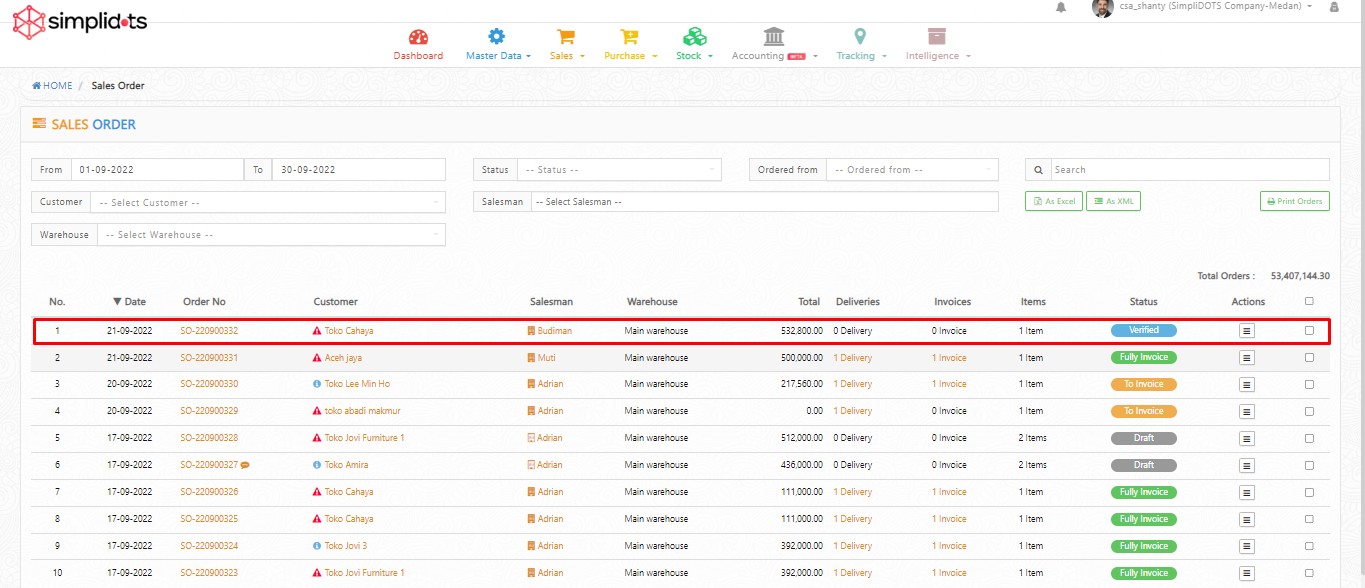
**Step 1.** Masuk ke menu <mark style="color:blue;">**Sales**</mark>**&#x20;>&#x20;**<mark style="color:blue;">**Order**</mark>**&#x20;>&#x20;**<mark style="color:blue;">**Orders**</mark>**.** Lalu klik tanda **(**<mark style="color:blue;">**+**</mark>**)** untuk menambahkan pesanan baru. Silakan lengkapi nama customer dan product yang akan dipesan. Selanjutnya, bisa klik <mark style="color:blue;">**Save & Verify.**</mark> Anda sudah berhasil membuat pesanan dengan status <mark style="color:blue;">**Verified**</mark>**.**&#x20;

<figure><img src="https://1936324811-files.gitbook.io/~/files/v0/b/gitbook-x-prod.appspot.com/o/spaces%2F-MMsbbXMQxBVcIuCn-j4%2Fuploads%2F6PJKS0LaJAiVM0QgAwHT%2Fbackorders.png?alt=media&#x26;token=7f3418d1-f308-421d-8166-5bad706f36f9" alt=""><figcaption></figcaption></figure>

<figure><img src="https://1936324811-files.gitbook.io/~/files/v0/b/gitbook-x-prod.appspot.com/o/spaces%2F-MMsbbXMQxBVcIuCn-j4%2Fuploads%2FYrUozP8w20LcVIhRHsOX%2Fback2.png?alt=media&#x26;token=a00f0499-75af-4137-99c4-787b6a8514ac" alt=""><figcaption></figcaption></figure>

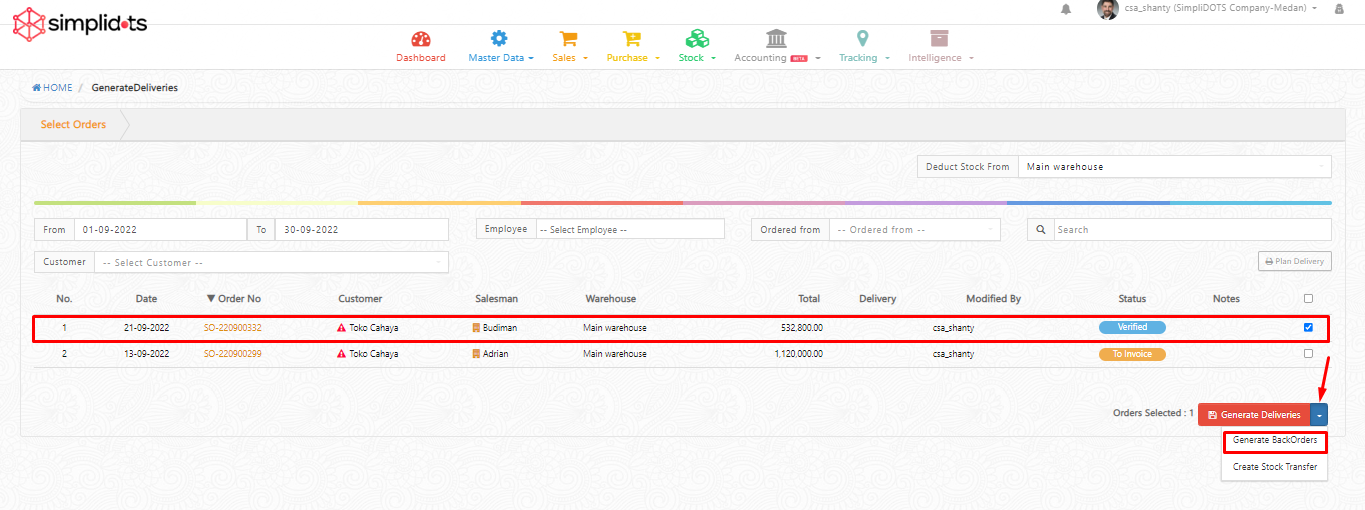
**Step 2.**  Selanjutnya, silakan masuk ke menu <mark style="color:blue;">**Sales**</mark>**&#x20;>&#x20;**<mark style="color:blue;">**Order**</mark>**&#x20;>&#x20;**<mark style="color:blue;">**Generate Deliveries**</mark>**.** Pilih pesanan yang ingin diproses nanti dengan klik <mark style="color:blue;">**checklist**</mark>**,** selanjutnya klik logo ![](https://1936324811-files.gitbook.io/~/files/v0/b/gitbook-x-prod.appspot.com/o/spaces%2F-MMsbbXMQxBVcIuCn-j4%2Fuploads%2Fr3hsrdx9vrvmSIvYaMqM%2Fbacko.png?alt=media\&token=4ec35ce5-76a6-4bb4-9a3d-76c7d61a41fc) pada tombol <mark style="color:blue;">**Generate Deliveries**</mark> lalu klik <mark style="color:blue;">**Generate BackOrders.**</mark>&#x20;

<div><figure><img src="https://1936324811-files.gitbook.io/~/files/v0/b/gitbook-x-prod.appspot.com/o/spaces%2F-MMsbbXMQxBVcIuCn-j4%2Fuploads%2Fjg73VrLg6b5fuX74kRrq%2Fback3.png?alt=media&#x26;token=7dc4755c-ac70-4f65-9d83-83309d39b271" alt=""><figcaption></figcaption></figure> <figure><img src="https://1936324811-files.gitbook.io/~/files/v0/b/gitbook-x-prod.appspot.com/o/spaces%2F-MMsbbXMQxBVcIuCn-j4%2Fuploads%2FkyEPpk0FR7w0XACn5ALg%2Fback4.png?alt=media&#x26;token=1efdf781-9dab-4058-9910-e6bf94e2f497" alt=""><figcaption></figcaption></figure></div>

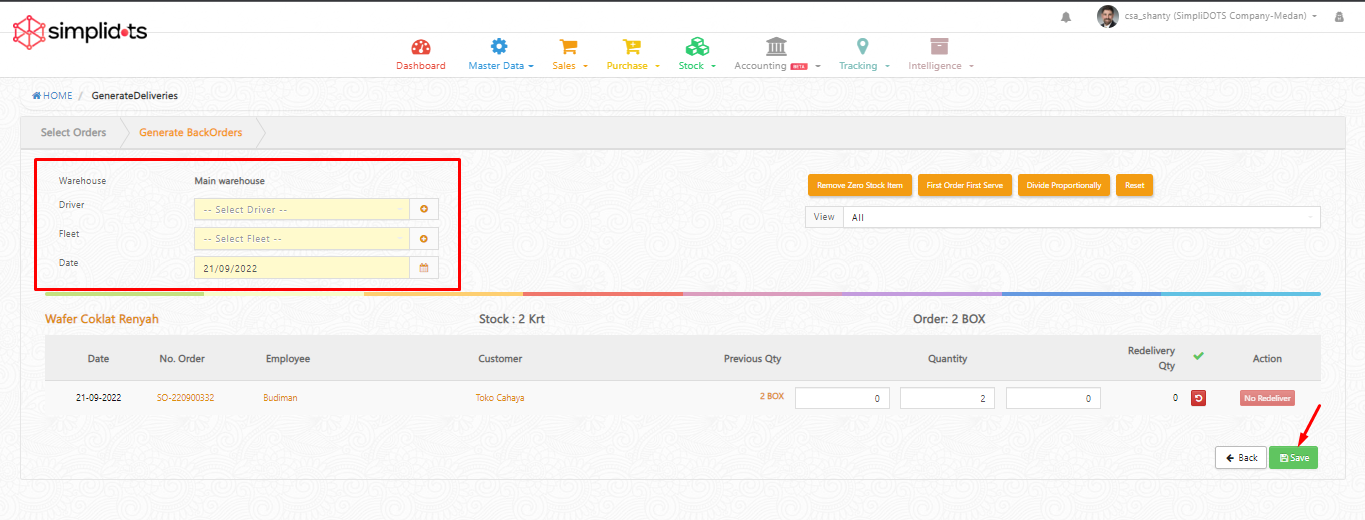
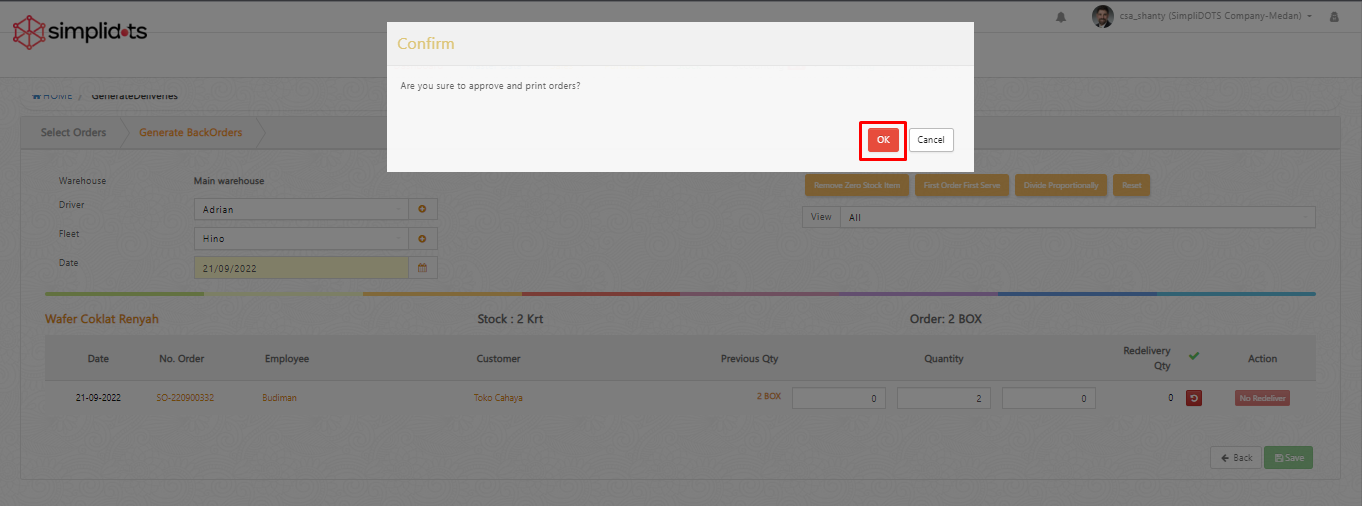
**Step 3.** Selanjutnya, lengkapi data berikut <mark style="color:blue;">**Driver**</mark>, <mark style="color:blue;">**Fleet**</mark>, dan <mark style="color:blue;">**Date**</mark>. Jika sudah sesuai Anda bisa klik <mark style="color:blue;">**Save**</mark>. Setelah itu akan muncul notifikasi untuk setujui dan print pesanan, Anda bisa klik <mark style="color:blue;">**OK**</mark>.

<div><figure><img src="https://1936324811-files.gitbook.io/~/files/v0/b/gitbook-x-prod.appspot.com/o/spaces%2F-MMsbbXMQxBVcIuCn-j4%2Fuploads%2Fgl468ao5WBuTFDniQNSI%2Fback5.png?alt=media&#x26;token=042441de-0d7b-44f3-bda3-a929fa99640a" alt=""><figcaption></figcaption></figure> <figure><img src="https://1936324811-files.gitbook.io/~/files/v0/b/gitbook-x-prod.appspot.com/o/spaces%2F-MMsbbXMQxBVcIuCn-j4%2Fuploads%2Fb6QROwefOS9W2SfYhlnZ%2Fback7.png?alt=media&#x26;token=5d1ec59e-c08a-4a5d-a054-bbc899694590" alt=""><figcaption></figcaption></figure></div>

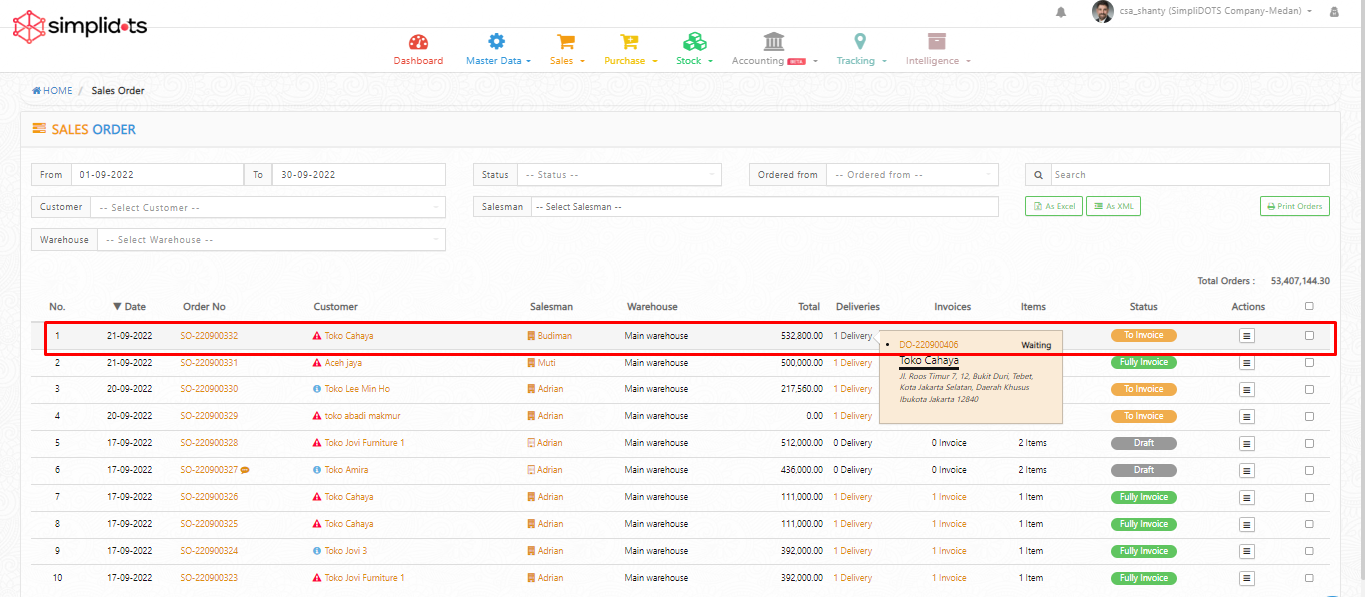
**Step 4**. Anda sudah berhasil membuat pesanan nanti (**BackOrders**), status pesanan akan berubah menjadi <mark style="color:blue;">**To Invoice**</mark> dengan nomor surat jalan **(DO)** status <mark style="color:blue;">**Waiting**</mark>**.**

<figure><img src="https://1936324811-files.gitbook.io/~/files/v0/b/gitbook-x-prod.appspot.com/o/spaces%2F-MMsbbXMQxBVcIuCn-j4%2Fuploads%2FHAdGcpAfzeW1iwHuy1fD%2Fback8.png?alt=media&#x26;token=402b393c-e513-4a3d-9524-60cb5363dab4" alt=""><figcaption></figcaption></figure>

{% hint style="info" %}
**Catatan :**&#x20;

* **Membuat Pesanan nanti (BackOrders) tidak memotong stock karena status DO adalah Waiting.**
* **Untuk proses Pesanan nanti (BackOrders) bisa melalui menu Sales > Delivery > Delivery Orders lalu lakukan Approve.**
  {% endhint %}